Lightweight responsive action sheet with animation for React web applications


- No stylesheet import — the component injects its own styles
- Themeable via props or CSS custom properties
- SSR safe, ships ESM + CJS with TypeScript types
- Zero runtime dependencies
npm install --save responsive-react-actionsheetReact 16.8 or newer is required (it is a peer dependency).
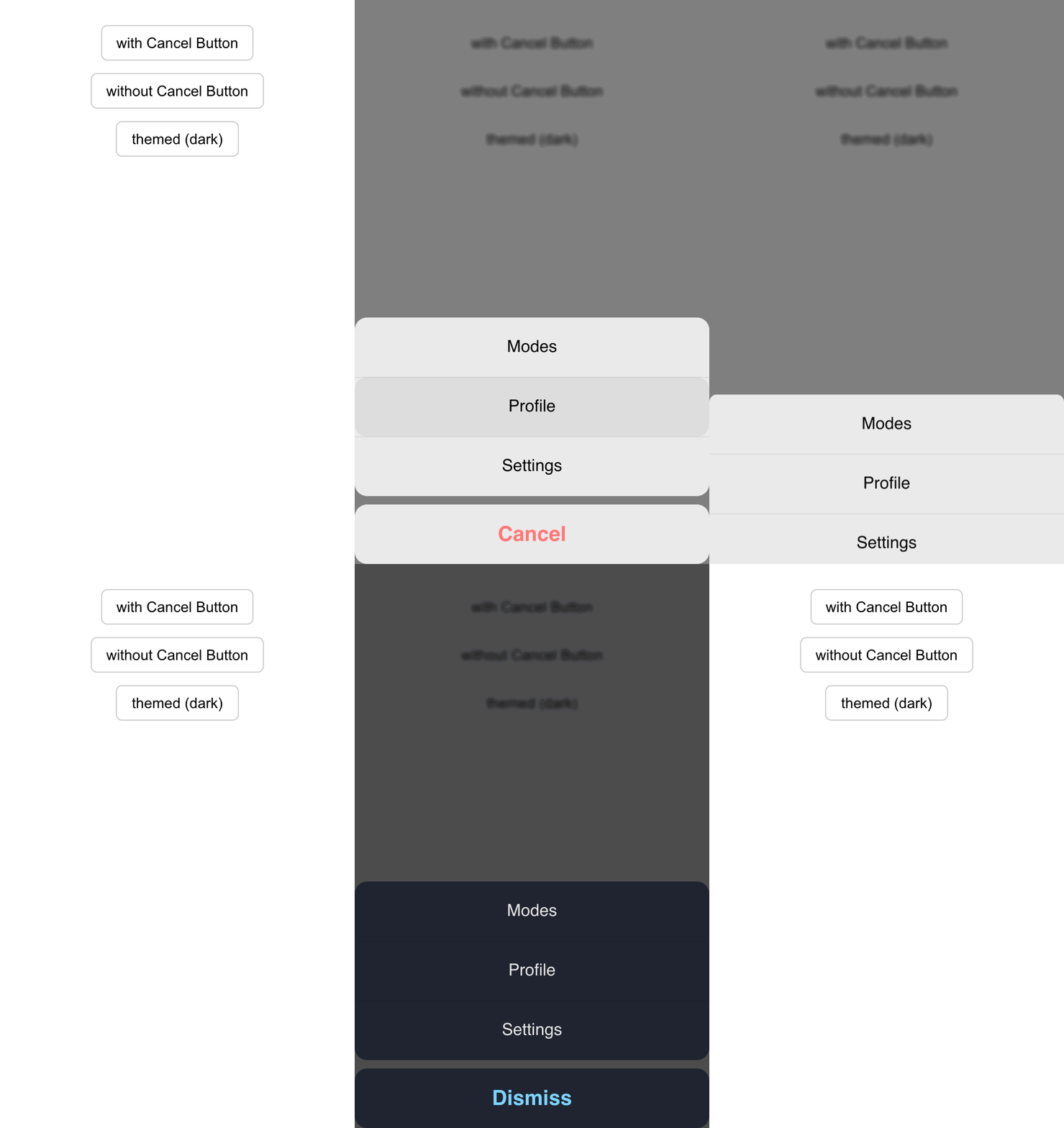
All three example variants, in order — with a cancel button, without one, and a fully themed dark sheet driven by the color props. Run it yourself:
cd example && npm install && npm run devOne import. The stylesheet is injected automatically the first time a sheet mounts.
import React, { useState } from 'react'

import Actionsheet from 'responsive-react-actionsheet'

const menus = ['Modes', 'Profile', 'Settings']

const App = () => {
  const [visible, setVisible] = useState(false)
  const [selected, setSelected] = useState('')

  const handleActionClick = (i: number) => {
    setSelected(menus[i])
    setVisible(false)
  }

  return (
    <>
      <button onClick={() => setVisible(true)}>Open</button>

      <Actionsheet
        visible={visible}
        menus={menus}
        onClick={handleActionClick}
        onRequestClose={() => setVisible(false)}
        showCancelButton
        cancelText='Custom Cancel text'
      />

      <h4>{selected}</h4>
    </>
  )
}

export default App| Property | description | Type | Default |
|---|---|---|---|
visible |
handles visibility of the action sheet | boolean | false |
menus |
array of list items to show | string[] | - |
onClick |
handle click on list items | function(index: number) => void | - |
onRequestClose |
function to close the action sheet | function() => void | - |
showCancelButton |
flag to show or hide the cancel button | boolean | false |
cancelText |
modify cancel text if showCancelButton is true | string | 'Cancel' |
backgroundColor |
surface color of the menu and cancel sheets | string | rgba(246,246,246,.9) |
textColor |
color of the menu item labels | string | #000 |
cancelTextColor |
color of the cancel button label | string | #ff7878 |
overlayColor |
color of the backdrop behind the sheet | string | rgba(0,0,0,.5) |
Pass any of the four color props:
<Actionsheet
  visible={visible}
  menus={menus}
  onClick={handleActionClick}
  onRequestClose={() => setVisible(false)}
  showCancelButton
  backgroundColor='#1f2430'
  textColor='#e6e6e6'
  cancelTextColor='#7dd3fc'
  overlayColor='rgba(0, 0, 0, 0.7)'
/>
Each prop sets a CSS custom property on the sheet's root element, so you can also theme it from your own stylesheet without touching props — useful for media queries or a global dark mode:
.ras-actionsheet {
  --ras-bg: #1f2430;
  --ras-text: #e6e6e6;
  --ras-cancel-text: #7dd3fc;
  --ras-overlay: rgba(0, 0, 0, 0.7);
}
For anything beyond color, the class names are stable and unhashed:
ras-actionsheet, ras-show, ras-backdrop, ras-wrap, ras-menu,
ras-menu-item, ras-cancel, ras-cancel-btn.
Existing code keeps working. Two things worth knowing:
- The CSS import is no longer needed.
import 'responsive-react-actionsheet/dist/index.css'still resolves and is still published, so you do not have to remove it — it is simply redundant now. Loading it alongside the injected copy is harmless. onClicknow receives a realnumber. It previously handed back the rawdata-idattribute, which was the string"0","1", … despite the docs and types promising a number. If you were comparing strictly (i === '1') or concatenating the argument, update those call sites.
The React peer range is now ^16.8 || ^17 || ^18 || ^19; React 16.0–16.7 are no
longer supported, because the component uses hooks to inject its styles.
npm install          # installs and builds
npm run verify       # generated-file check, lint, typecheck, tests, build
npm test             # unit tests only
Styles are authored in src/styles.css. That file is the single source of
truth: scripts/generate-styles.mjs turns it into src/styles.ts (which is
what gets injected at runtime) and scripts/copy-css.mjs copies it to
dist/index.css for the legacy import path. Both run automatically as part of
npm run build and npm test — edit the .css, never the generated .ts.
To run the demo app:
cd example && npm install && npm run devMIT © codeAesthetic